Kanban board
Move work through To Do, In Progress and Done. See what deserves attention now without turning planning into another job.
 Everyone PlansVisual planning without clutter
Simple planning for real life
Everyone Plans combines a visual Kanban board with a clear tree view. Organize projects, to-do lists, studies, hobbies, trips, weekly plans and more ... All without accounts, distractions or unnecessary features.
View the quick guideWindows desktop · Works offline · Your files stay yours
Requires Windows 10 or 11 (64-bit)
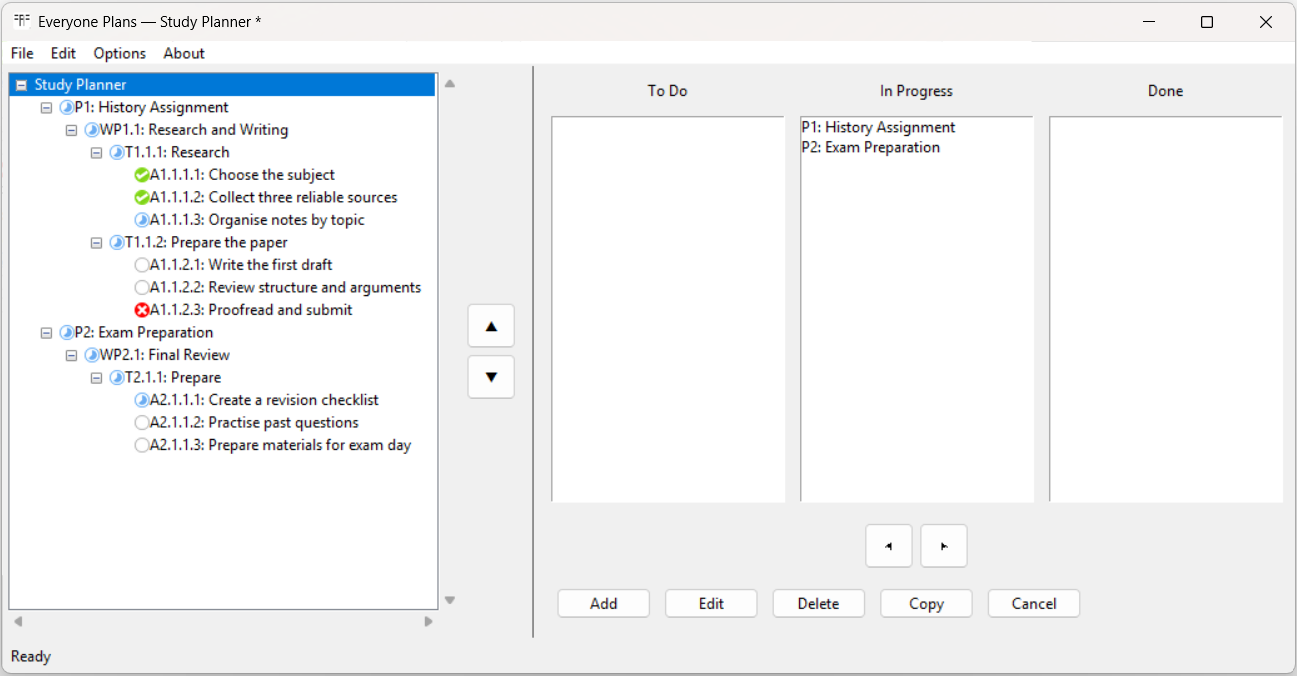
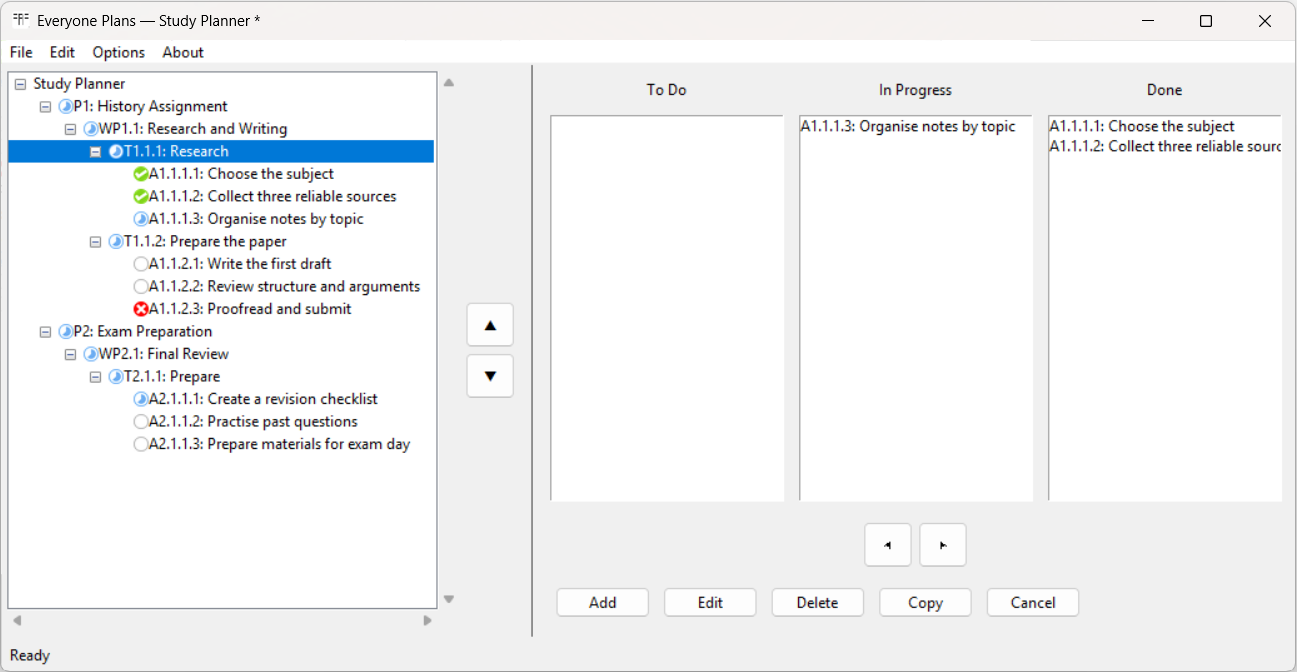
Inspired by the Kanban board. Extended with a tree view for overview. Designed to stay simple.
One plan, two useful views
Move work through To Do, In Progress and Done. See what deserves attention now without turning planning into another job.
Keep the whole structure visible - from the complete plan to individual projects, tasks and activities.
Save portable, readable planning files on your own computer or in a shared family folder. No online account is required.
English, Italian, Ukrainian, Bengali, German, Thai, Polish, Spanish, French, Indonesian, Japanese, Vietnamese, Traditional Chinese, Hindi, Korean, Russian, Brazilian Portuguese, Turkish, Dutch and Simplified Chinese.
Planning belongs to everyone
ProjectsOrganize deliverables, tasks and activities.
StudyPlan assignments, exams and revision.
HomeCoordinate renovations, family plans and weekly work.
TripsStructure research, bookings and preparation.
HobbiesTurn a personal idea into clear next steps.
Start without guessing
Open an example, see how the structure works and adapt it to your own plan.
Installation guide
All three versions contain the same application. For most people, the current-user installer is the simplest choice.
Installs Everyone Plans for your Windows account. Usually does not require administrator rights and creates the normal shortcuts.
Installs the application for every Windows account on the computer. Administrator rights are required. Professional users still need their own licences.
Extract the ZIP to a folder and run Everyone Plans from there. No installation required.
Download the package you prefer, then run the installer - or extract the portable ZIP before opening the application.
Try it before you buy
Explore the complete application and decide whether its simple visual approach works for you. No account or payment details are required.
Create, edit, move, copy, save and export your own planning files with the complete Everyone Plans workflow.
Open or create a larger plan and Everyone Plans automatically switches to Preview mode: explore everything and export to Excel, but without saving changes. Purchase the full version whenever you are ready to plan without limits.
Everyone Plans 1.0
One purchase will include the current-user installer, all-users installer and portable Windows edition.
One purchase - three download options
After secure checkout through Lemon Squeezy, you receive immediate access to the current-user installer, all-users installer and portable ZIP.
$19.95
One licence for you and the members of your household.
Buy Personal$39.95
Per user, for professional or workplace use.
Buy ProfessionalGood to know
After checkout through Lemon Squeezy, you receive immediate access to all three Windows packages: the current-user installer, the all-users installer and the portable ZIP.
You can plan normally with up to 1 project, 2 work packages, 3 tasks and 10 activities in total. Larger plans open in Preview mode and cannot be saved, but Excel export remains available.
It can organize projects and larger plans, but it is intentionally lighter than traditional project management software. It also works well for students, households, trips, hobbies and weekly planning.
No. The Windows application works offline and saves planning files locally.
The tree shows the complete planning hierarchy. The Kanban board shows the selected level across To Do, In Progress and Done.
The household licence is designed for use within one household. Planning files can be kept in a shared folder chosen by the users.
Behind Everyone Plans
Everyone Plans grew from a practical frustration in my daily work as a project manager. My work was spread across endless to-do lists, and although the individual tasks were recorded, I regularly lost sight of the larger picture.
During an Agile course, I encountered the idea of a Kanban board. I liked its visual simplicity, but I also wanted a structured overview that could show how projects, tasks and activities belonged together.
As a hobby project, I began developing a tool that combined both ideas: a Kanban board for focus and a tree view for overview. Over the following two years, I continued adapting it around the way I actually worked. It gradually became the tool I had originally been looking for: clear, practical and free from unnecessary distractions.
Eventually, I realised that the same approach could also help with studies, trips, hobbies, household work, weekly planning and much more. That is why I decided to make Everyone Plans available to others.
Giovanni Bonny Independent developer of Everyone Plans